
The AgentSuper App
AI agents that work while you don’t. A workspace for vibe coding. Coding threads you read instead of watch.
Pro, $50/month
For Mac, Windows & Linux.
Bring your own AI subscription or API key.
Agent. Code. Thread.
Flip the switch in the title bar and the whole app changes with it — the rail, the pane, the composer.
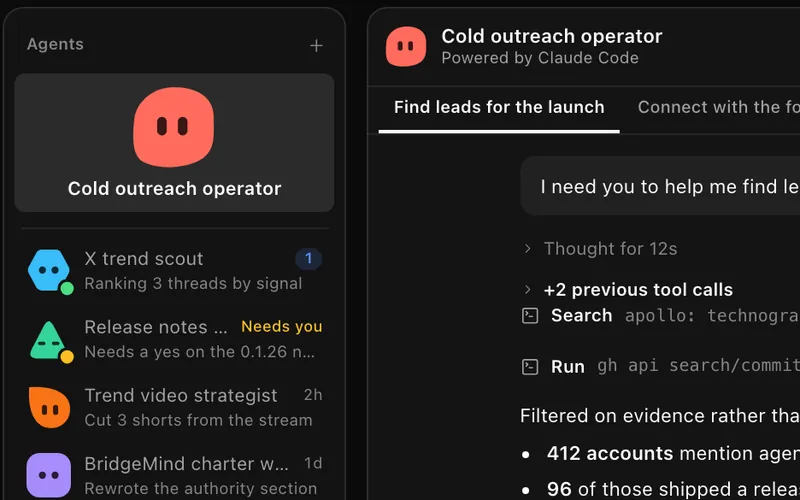
Teammates on routines.
Name an agent, give it a brief, put it on a routine. The work runs on a schedule — you review the result.
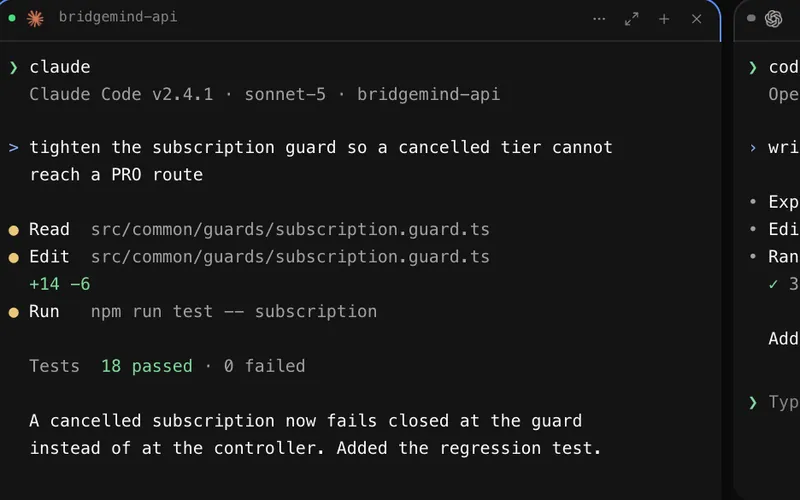
Your terminals, your folders.
Live shells over the folders you already work in, with a browser or a thread docked beside them. The full workspace is one fold down.
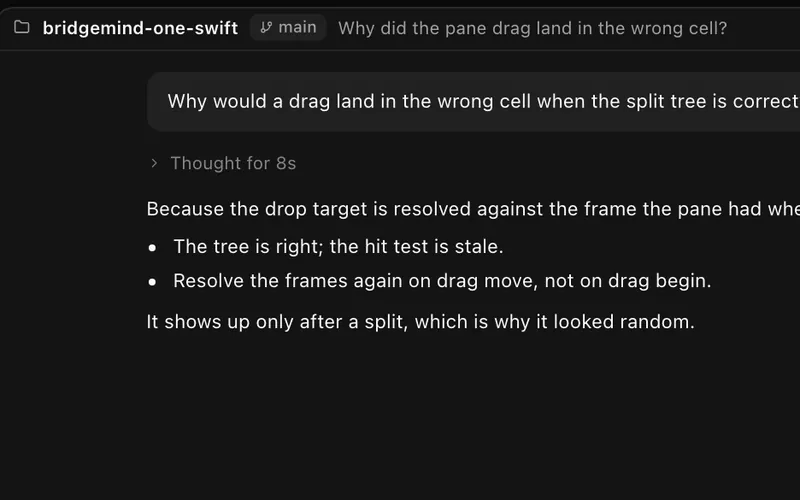
Coding you read instead of watch.
Keep each coding session in its own thread. Start on its own or add a project folder, review approvals, and follow the agent’s work as a conversation.
Code mode
Built for vibe coding.
You describe the work; the agents in these panes write it. Claude Code, Codex, Cursor Agent, Gemini CLI, GitHub Copilot, Grok Build — whatever is on your PATH, launched here and billed through your own accounts.
Panes are real terminals.
Each one is a live shell over one of your folders. Launch an agent into it and the diff lands on your disk.
Split, snap, dock.
Drag to split the canvas, snap panes to presets, and Tidy squares the layout back up. Parallel agents stay legible.
The check happens in the window.
Dock a browser on localhost or a thread beside the shell — review the result where the code is, not in another app.
BridgeMind preview in Code mode. The interactive preview loads as this section approaches the viewport.
Not a screenshot — the window is live. Click around it.Not a screenshot — tap the window to explore the live app.
- Claude Code
- Codex
- Cursor Agent
- Gemini CLI
- GitHub Copilot
- Grok Build





Also Droid, OpenCode, Kimi Code, Amp, Antigravity, and Aider. If it runs in a terminal, it runs here.
Accounts
Switch accounts. Keep the thread.
Sign in to every Claude Code and Codex account you pay for — work, personal, a client’s. Each conversation runs on the one you pick, and a usage limit becomes a choice instead of a dead end.
Their sign-in, not ours.
Each account logs in through Claude Code’s or Codex’s own browser sign-in, in a folder of its own. BridgeMind never reads or stores the token.
A default, and an override.
Name every account, set the default for new conversations, and point one workspace or agent at another. Codex rows show the usage each account reports.
A limit pauses. You choose.
Resume when the account resets, or continue on another one you own. A summary carries the conversation across; the work stays on your disk.
In BridgeMind One for Mac — Settings → Agents.
 BridgeVoice
The fastest voice to text on the market.
Hold a key, describe the change, release — the prompt is in your agent’s composer before your hands are back on the keys. Included with Pro.
Release the key. The text is there.
Parakeet V3 or Whisper runs on your own machine — no upload, no round trip, no waiting on a server.
Made for prompts, not memos.
Speak the change into Claude Code, Codex, or any field with a cursor. Enhance Prompt turns a rambling take into a brief your agent can act on.
Local or cloud. Your call.
On-device models keep audio on your computer. Cloud transcription through MAI-Transcribe-2 covers 60 languages with automatic detection.
BridgeVoice interactive demo. The app window loads as this section approaches the viewport.
The home of the
vibe coding movement.
Join the internet’s largest and fastest-growing vibe coding community. Build alongside us on livestreams, trade ideas in Discord, and turn what you learn into something you ship.
ARR $210,364Day 225 of vibe coding an app to $1,000,000, on streamVibe Coding With GPT 6 Astra
WatchWatch on YouTube
Recent livestreams

Builders, on the record.
What builders say about BridgeMind, in their own words. Reviews from Discord and YouTube, unedited.
Pick a plan. It pays for itself.
Every plan runs agents, terminals, and threads. Put one recurring job on a routine and it earns the month back.
Basic
For builders who want the app on its own.
Basic, $20 a month, billed monthlyCancel anytime
5,000 credits a month
For Auto runs, Create with AI, and other metered features in the app.
BridgeMindAgent Super App
Agent, Code, and Thread — one native desktop app.
- BridgeVoice, BridgeVerse, and voice orchestration come with Pro.
Pro
RecommendedFor builders who run agents all day.
Pro, $50 a month, billed monthly7-day money-back guaranteeCancel anytime
12,500 credits a month
For voice orchestration, cloud voice to text, and other metered features.
BridgeMindAgent Super App
Agent, Code, and Thread — one native desktop app.
BridgeVoiceVoice to text
Turn your spoken words into text, on your machine or in the cloud.
BridgeVerseYour agents, in 3D
A campus inside the app: a room for each workspace, a desk for each agent.
- Bridgecademy, coming soonSoon
Ultra
For builders who direct their agents by voice all day.
Ultra, $100 a month, billed monthlyCancel anytime
50,000 credits a month
4× Pro’s credits, for voice orchestration and every other metered feature.
Everything in Pro
BridgeMind, BridgeVoice, and BridgeVerse.
- Bridgecademy, coming soonSoon


Or sign in with Google, then choose your plan.
By continuing you agree to the Terms and Privacy Policy.
Bring your own AI
Use the subscription you already pay for, or an API key. Your provider bills its own usage.
- Claude
- ChatGPT · Codex
- SuperGrok
 SuperGrok
Runs on
- Mac: macOS 14.0 or later · One universal installer for Apple silicon and Intel.
- Windows: Windows 10 or 11, x64.
- Linux: x86_64.
Questions, answered.
What is an Agent Super App?
One native desktop app for everything you do with AI agents — the teammates that run on routines, the terminals they code in, and the threads where you read that work instead of watching it. BridgeMind is the first.
What is vibe coding?
Building software by describing it. You say what should change; an agent in a terminal changes it. Code mode is that terminal, with dictation one held key away.
Does BridgeMind include Claude, Codex, or Grok usage?
No. You need a BridgeMind plan to use the app, plus your own AI accounts. We recommend a Claude subscription for Claude Code, a ChatGPT subscription with Codex access, or SuperGrok for Grok Build, depending on the agents you use. You do not need all three. You can also bring your own API key (BYOK) where supported. Provider subscriptions and usage are billed separately from BridgeMind and follow each provider’s limits.
What are credits?
Credits pay for metered features inside BridgeMind, including Auto runs, Create with AI, voice orchestration (directing your agents by voice), and cloud voice to text. On-device transcription does not use credits. Credits do not pay for usage through your own Claude, Codex, or Grok account. Each month Basic includes 5,000 credits, Pro 12,500, and Ultra 50,000, refreshed each billing cycle. Unused credits do not roll over.
Can I cancel later?
Yes. Cancel whenever you like and your plan stays active through the end of the period you have already paid for. Change plans from your account: upgrades start right away with a prorated charge, and downgrades take effect at your next renewal.
Is there a guarantee?
First-time Pro purchases come with a 7-day money-back guarantee. Email [email protected] within 7 days of your first successful charge (monthly or annual) and we will refund that charge. We then end paid access and zero unused cycle credits. Basic and Ultra are not covered.